
Built with the people who use it
Pixilive never stops evolving. We build it alongside the organisers and photographers who rely on it every day, out in the field.
The right photos, to the right people
Hundreds of photos, hundreds of recipients, and no sorting for your team. Everyone finds or receives theirs while the event is still on.
-
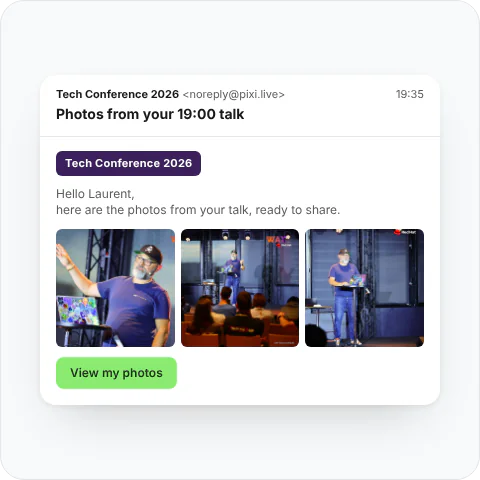
Automatic emails
Based on your programme, speakers and partners receive their photos by email, in your name.
-
No sign-up, no app
One link or QR code to the gallery: everyone finds their photos instantly, on their own phone.
-
Hand-picked selections
Email a selection of photos to a journalist, a VIP or a partner in a single click.
-
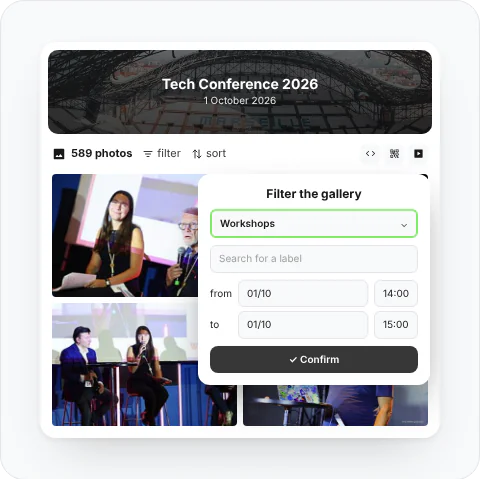
Advanced filters
By room, date or label, everyone finds their photos in seconds. No biometric data involved.
-
Live slideshow
A simple web page, shown full screen. Nothing to install: your AV team can put it up with ease.
-
Embed on your website
A simple iframe puts the gallery on your website or app. Your photos stay on your official channels.
Ready-to-use photos, live
The best photos from your event, edited and ready to share while engagement is at its peak.
-
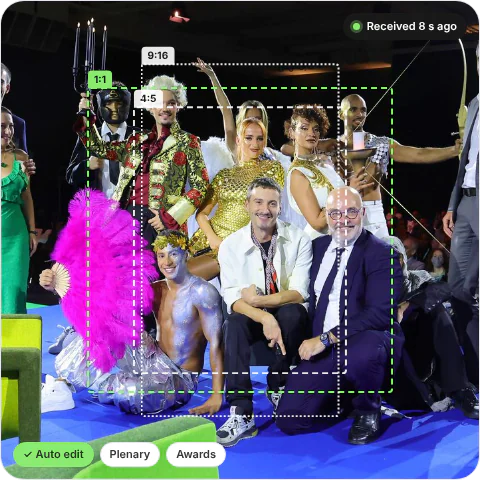
Automatic editing
Exposure, noise, colour: every photo is corrected before it’s published, in a matter of seconds.
-
Smart cropping
AI spots the subject and crops each photo for social media: 1:1, 4:5, 9:16. Adjust any frame by hand.
-
Selection on the go
Your photographer only sends the best shots, as the event unfolds. A professional eye comes first.
-
Organised as it happens
Folders, labels, individual spaces: every photo is filed on upload, in the right place. No sorting later.
-
FTP transfer
Quick and simple, compatible with all professional cameras. Automatic editing takes care of the rest.
-
Lightroom plugin
When a photo calls for manual editing, the plugin exports it straight into the gallery.
An organised photo gallery in your colours
A gallery that looks like your brand, fast and clear on every screen. Attendees find their way without instructions.
-
Your branding
Cover image, title, watermark, folders: the gallery follows your visual identity.
-
Partners
Your partners’ logos on all or some of the photos: visibility you can sell to earn revenue from your images.
-
Reporting and removal
Photos go live without prior moderation, and attendees can report one in a click. Remove it, and they’re told.
-
Visibility
Public, unlisted or private. A single folder can be made private without closing the whole gallery.
-
Collaborative gallery
As many photographers as you like in one gallery. Every photo keeps its author’s name.
-
Native downloads
On phones, photos go straight to the camera roll, one by one or in batches. On computers, in one ZIP.
Their photos, and theirs alone
Photo wall, filming, portraits, VIP evening: each guest finds their photos in their own individual space. No facial recognition.
-
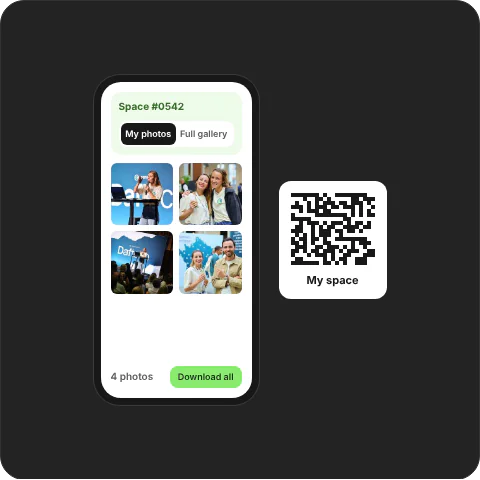
Setting up spaces
Guests create their own space, or the photographer does it for them. Spaces can also be prepared in advance.
-
One QR code per space
Each space has its own QR code. The photographer scans it before uploading: one gesture, no lost time.
-
Reserved photos
Photos linked to a space stay out of the public gallery. They only open with that space’s link or QR code.
-
Public gallery and spaces
Both live in the same gallery. One button takes guests from their own photos to the public gallery.
-
Group photos
One photo can belong to several spaces. Everyone in the picture finds it in their own.
-
No data required
Name and email are optional. Consent to marketing use is requested from each guest, and recorded.
A print station, linked to the gallery
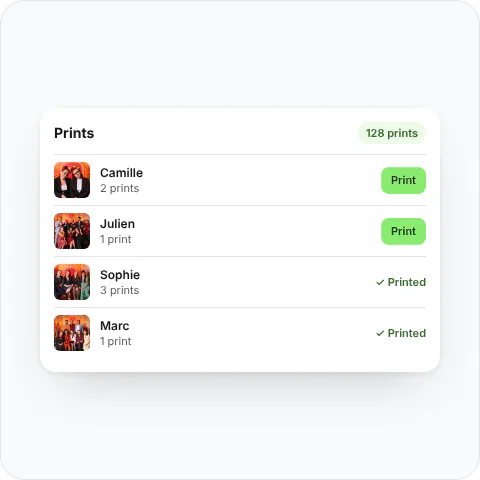
Your guests go home with a print, produced on site in seconds.
-
From their phone
Guests pick a photo in the gallery and request a print. By the time they reach the stand, it’s waiting.
-
With or without approval
A host approves each print, or guests help themselves. Your call, based on footfall and paper budget.
-
Branded prints
A frame in your colours, portrait or landscape. The print ends up on a desk, with your logo on it.
-
Print statistics
Print counts and a list of every print: measure the stand’s impact and add it to the gallery report.
-
Pixilive Print Station
A Mac app tested with DNP printers. Print live straight from the gallery, or through a hot folder.
Everything under control
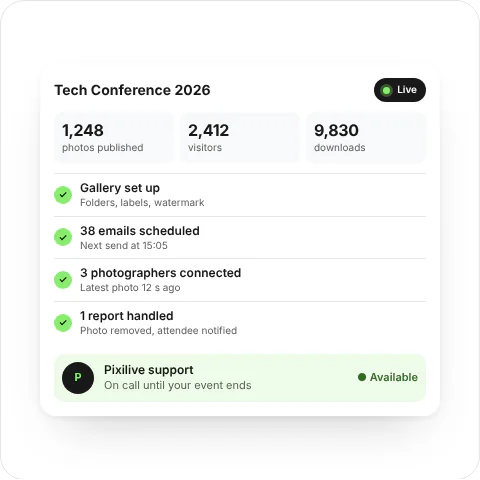
You decide who does what, and you measure the results. We set everything up and stay within reach from start to finish.
-
Roles and access
Colleagues and photographers join the gallery, each with their own rights: view, upload or moderate.
-
Moderation and reports
A photo reported by an attendee comes straight to you. You or a moderator remove it in one click.
-
A report in figures
Visitors, downloads, prints: your numbers are ready for the debrief, without tracking your guests.
-
Turnkey set-up
Gallery, folders, labels, emails: it’s all prepared from your programme. You just sign it off.
-
Support during the event
A team on call and within reach from start to finish, with someone on site if you’d like.
-
No data collection
By default, attendees are asked for nothing: no account, no email, no selfie. The gallery works without.
Want to dig deeper? The documentation walks you through every feature, step by step.
Read the documentationLet’s talk about your event
A no-strings demo on a real gallery, to see how Pixilive fits your needs.